Introducing Relkit
A TypeScript backend framework where you only write the business logic
On this page
I’ve spent years building products end to end: backends, web and mobile frontends, and sometimes even the designs in Sketch and Figma. And every new project started the same way. Before writing a single line of business logic, I was wiring up auth, a database, Redis, a job queue, API docs, a typed client for the frontend team, logging…
I always wanted something that would take care of all of that, every setup and every decision, and just let me focus on the product.
Relkit
I built Relkit from a developer-experience perspective. That was 99% of my focus while working on the first implementation with my coding agents :)
Just to be clear from the start: Relkit is a backend framework. It doesn’t care what’s on the other side. React, Vue, Svelte, a mobile app or even another server can all talk to it: every route is plain REST with an OpenAPI spec, and TypeScript callers get a generated typed client on top.
Relkit covers almost everything your application might need:
- Authentication
- Database
- Realtime channels
- Streaming
- Events (pub/sub)
- Caching
- Storage
- Background jobs
- AI agents, graphs, nodes and MCP
- A generated typed client for your frontend (your frontend teammate will never ask you about an endpoint again)
- OpenAPI out of the box, with an optional Scalar API reference UI
- Observability done under the hood
- Docker support for local providers (Redis, MinIO, Inngest and friends)
- An Inspector that lets you visualize every piece of your application without reading a single line of code
And you won’t wire any of this by hand. Relkit ships with a CLI that does the heavy lifting, from creating the project to scaffolding every piece you’ll see in this article:
bunx create-relkit@latest my-app
cd my-app
bun run dev
From there, bun run relkit add … creates functions, routes, services, caches, buckets, jobs, agents and more, and installs whatever each piece needs. You’ll see it at the start of almost every section below.
Inspector
This is my favorite feature so far. Every piece of your code is presented in a clean UI that you can visualize and test. It’s very useful when you join an existing project, and just as useful when your agents are doing a lot of stuff and you want to keep up from a high-level perspective.
In the Inspector you can see your application graph and how the pieces connect. You can see your agents, tools, functions, caches, database tables, jobs and storage files, plus the observability stuff like logs, traces and environments.
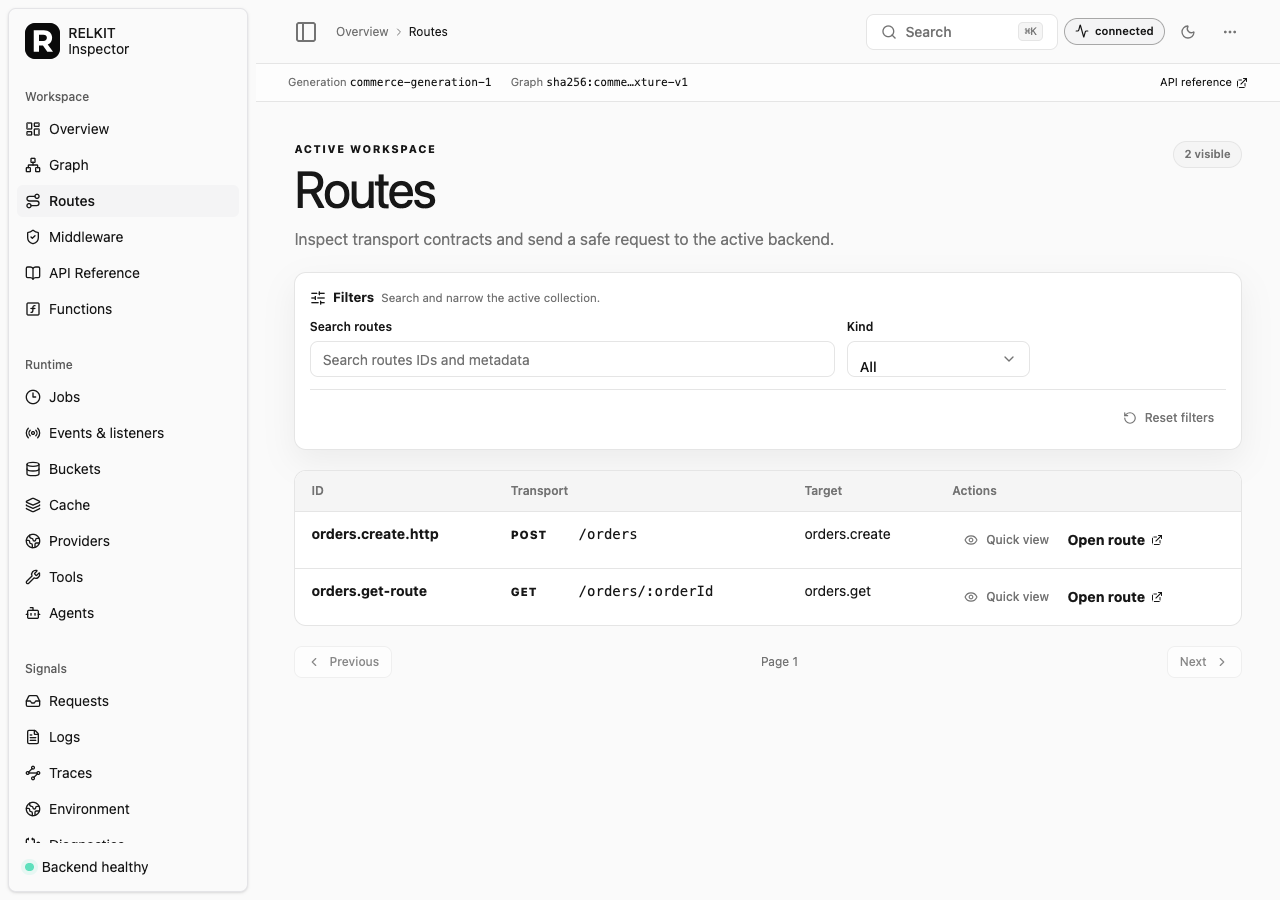
It’s an optional companion, so you turn it on when you want it:
bun run relkit add inspector
bun run relkit inspector   # opens on http://localhost:3210
Throughout this article we’ll build one small thing: an orders backend. Every section adds one piece to it, so by the end you’ll have seen the whole kit working together.
Functions
Functions are the heartbeat of Relkit. Every function is one piece of your system, responsible for one small, clear job. Keeping them that small helps in a lot of ways: testing gets easy, and you can compose little pieces to achieve a bigger task.
To create a function, start with the Relkit CLI:
bun run relkit add function create-orderThe CLI is interactive, so it simply asks you for anything it needs (like which service the function belongs to). Every command also has flags for scripts and CI, but you won’t need them to get started.
This generates a file you then fill in, something like this:
import { defineFunction } from "@relkit/app/functions";
import { z } from "@relkit/app/schema";
const createOrder = defineFunction({
  input: z.object({}),
  output: z.object({}),
  publishes: ["orders.created"],
  handler: async (input, context) => {
    const order = {};
    await context.events["orders.created"].publish(order);
    return order;
  },
});
export default createOrder;
Fill input and output with your own schemas; they’re validated on every call, and publishes is how a function declares, up front, which events it’s allowed to send. No surprise side effects.
You can use the same function in different places:
- Inside its own domain, call it directly:
createOrder.invoke({ ... }) - From another domain, go through its service:
orders.createOrder.invoke({ ... }) - From HTTP, give it to a route as a target:
defineRoute({ target: orders.createOrder })
And since it’s just a function, testing it doesn’t need a server: invokeFunction(orders.createOrder, { ... }) from @relkit/testing and you’re done.
Functions aren’t locked inside handlers either. A function is just a module you import, so any backend code in your app can call it, and it still goes through the same validation, timeouts and tracing as an HTTP request:
import orders from "@app/services/orders/service.js";
const order = await orders.createOrder.invoke({});
The same goes for other pieces: start a job with orders.exportOrders.trigger(input) or push a live update with orderStatus.trigger(...), straight from a route or any other backend code. The one thing that stays inside a function is resource access. Caches, buckets and the database reach you through the function’s context, so every access is declared and shows up in the graph.
Routes
Routes are inspired by the Next.js style: they follow your directory structure, and the location of the file decides the endpoint. If you have a route at src/routes/orders/[orderId]/route.ts, you get an endpoint at /orders/:orderId.
To create one with the CLI, just give it the URL (it will ask which service function each HTTP method should call):
bun run relkit add route /orders/:orderIdThis generates:
import { defineServiceRoutes } from "@relkit/app/routes";
import orders from "@app/services/orders/service.js";
export const { GET } = defineServiceRoutes(orders, {
  GET: "getOrder",
});
Need just one method? defineRoute is the single version:
// src/routes/orders/route.ts → POST /orders
export const POST = defineRoute({
  target: orders.createOrder,
  successStatus: 201,
});
Notice the route has no business logic. It only says “this URL calls that function”, and the orderId from the path is mapped into the function’s input for you. As a bonus, every route lands in the generated OpenAPI spec at /_relkit/v1/openapi.json.
Scalar
Reading an OpenAPI JSON file is nobody’s idea of fun. Turn on Scalar and you get a beautiful, interactive API reference for every route, where you can fill in inputs and send real requests to try things out:
bun add @scalar/hono-api-reference// relkit.config.ts
server: { apiDocs: { ui: "scalar" } },Restart the app and open http://localhost:3000/_relkit/v1/api-reference. Every route is listed with its parameters, request body, responses and validation errors, all generated from the same schemas your functions use. Change a schema and the docs change with it.
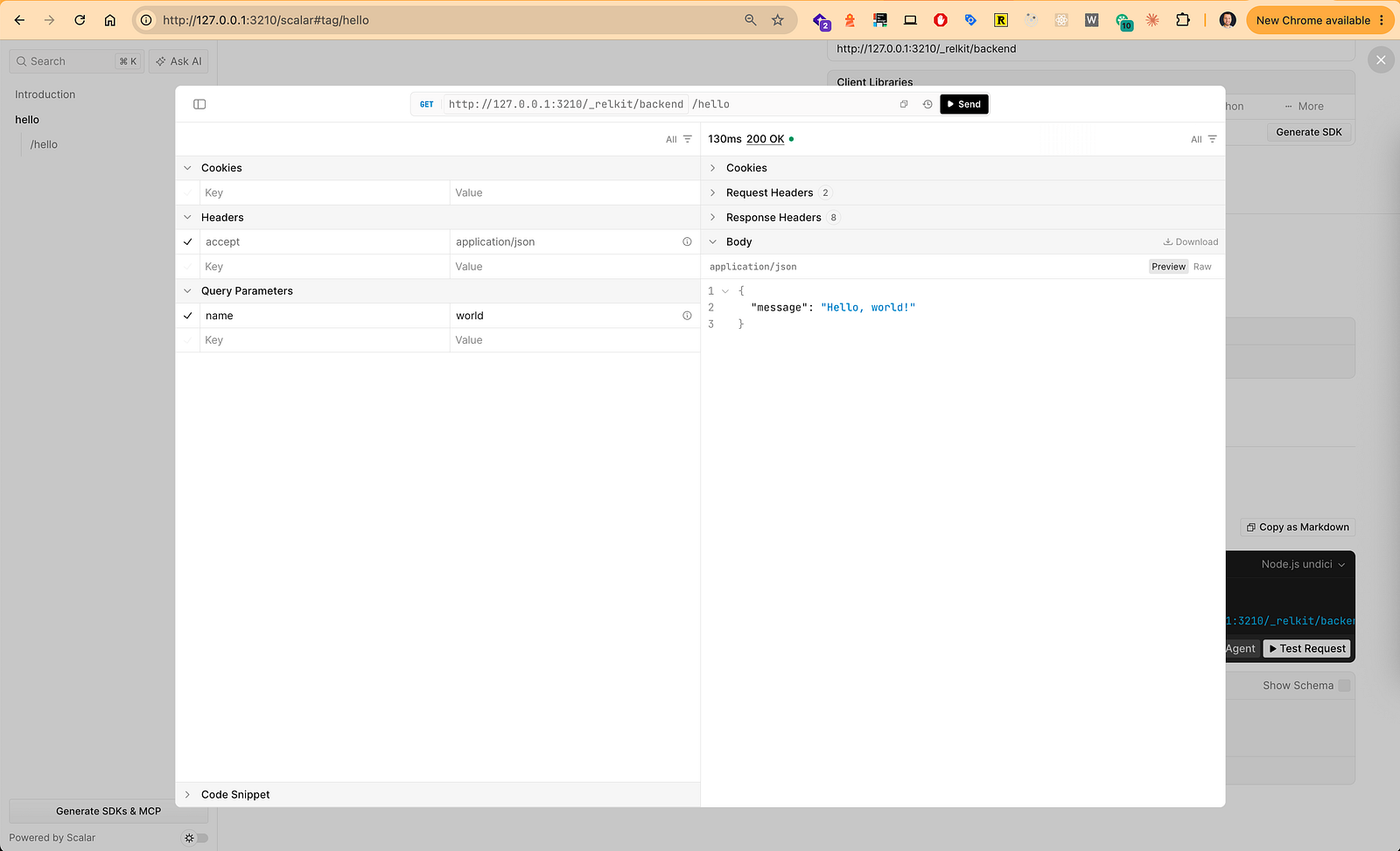
Scalar is off in production by default, and turning it on there requires protecting the docs endpoints. Docs visibility isn’t access control.
Services
You may have noticed that routes don’t import functions directly. They go through a service.
A service is the public front door of a domain. You organize your code by what your product does (orders, receipts, accounts), not by technology, and each domain gets its own folder:
src/services/orders/
├── service.ts      ← the public front door
├── functions/      ← business operations
├── events/         ← facts this domain publishes
├── cache/
├── tools/
└── agents/
The service.ts file picks which functions the rest of the app is allowed to use:
import { defineService } from "@relkit/app/services";
import createOrder from "./functions/create-order.function.js";
import getOrder from "./functions/get-order.function.js";
import orderCreated from "./events/order-created.event.js";
import exportOrdersTask from "./tasks/export-orders.task.js";
import exportOrders from "./jobs/export-orders.job.js";
export default defineService({
  functions: { createOrder, getOrder }, // callable operations
  events: { orderCreated },             // event contracts other domains can use
  tasks: { exportOrdersTask },          // durable work
  jobs: { exportOrders },               // public job names for that work
});
What about caches, buckets, tools and agents? They live inside the domain folder and the compiler finds them on its own, so they don’t need to be listed here. A function just asks for them in its dependencies when it needs them.
Anything you leave out stays private to the domain. A helper doesn’t become public just because you exported it in TypeScript. There’s also no registration array to maintain: the compiler discovers the service from source.
To scaffold a new one: bun run relkit add service.
Buckets
Every orders app eventually needs files: invoices, product images, receipts. A bucket gives your files a home, with rules built in.
bun run relkit add bucket invoicesLocally, that’s MinIO running in Docker. You don’t install anything by hand, and there are no S3 secrets to copy around. The config line looks like this:
// relkit.config.ts
bucket: { assets: docker(s3()) },
defaults: { bucket: "assets" },
Then you define the bucket with its rules:
import { defineBucket } from "@relkit/app/buckets";
export default defineBucket({
  id: "orders.invoices",
  profile: "assets",
  visibility: "private",
  maxObjectBytes: 5_000_000,
  allowedContentTypes: ["application/pdf"],
});
A function asks for the bucket in its dependencies, and then it’s simply there on the context:
const saveInvoice = defineFunction({
  input: z.object({ orderId: z.string(), pdf: z.file({ maxBytes: 5_000_000, mediaTypes: ["application/pdf"] }) }),
  output: z.object({ key: z.string() }),
  dependencies: { buckets: { invoices } },
  handler: async ({ orderId, pdf }, context) => {
    const key = `invoices/${orderId}.pdf`;
    await context.buckets.invoices.put(key, new Uint8Array(await pdf.arrayBuffer()), {
      contentType: "application/pdf",
    });
    return { key };
  },
});
Reading files back is just as friendly: get, head, exists, list, delete, and createReadUrl(key) when you want a temporary download link.
Events
Remember publishes: ["orders.created"] in our first function? Here’s the other side of it.
An event says “something happened”, and other functions can react to it without the original operation waiting for them. Perfect for “send a confirmation email” or “record analytics” kinds of work.
First, define the event and what it carries:
import { defineEvent } from "@relkit/app/events";
import { z } from "@relkit/app/schema";
export default defineEvent({
  id: "orders.created",
  input: z.object({ orderId: z.string() }),
});
Then subscribe to it from anywhere:
import { defineEventFunction } from "@relkit/app/events";
export default defineEventFunction({
  id: "orders.confirmation",
  event: "orders.created",
  handler: async (order, context) => {
    context.log.info("order.confirmation.requested", { orderId: order.orderId });
  },
});
The fun part: want analytics too? Add a second event function. You don’t touch createOrder at all. And the Inspector shows every event with its publishers and consumers, so you never lose track of who’s listening.
CLI shortcuts: bun run relkit add event and bun run relkit add event-function.
Caching
Some lookups are expensive, and a slightly old answer is totally fine. Product prices are the classic example.
bun run relkit add cache pricesDefine what the key and value look like, and how long values live:
import { defineCache } from "@relkit/app/cache";
import { z } from "@relkit/app/schema";
export default defineCache({
  id: "orders.prices",
  profile: "requests",
  key: z.object({ sku: z.string() }),
  value: z.number().int().nonnegative(),
  defaultTtlMs: 60_000, // one minute
});
Then use the one method you’ll reach for 90% of the time, getOrSet:
const getPrice = defineFunction({
  input: z.object({ sku: z.string().min(1) }),
  output: z.object({ sku: z.string(), unitPriceCents: z.number() }),
  dependencies: { cache: { prices } },
  handler: async ({ sku }, context) => {
    const unitPriceCents = await context.cache.prices.getOrSet({ sku }, async () => {
      // Only runs on a cache miss. Load from your database here.
      return 1_000;
    });
    return { sku, unitPriceCents };
  },
});
No Redis client, no key-string gymnastics, no JSON.parse. Keys and values are typed and validated. In the Inspector you can open the cache, see each key’s remaining TTL, and peek at its value.
Database
Relkit’s database service is built on Drizzle (MongoDB and Prisma integrations are on the way). One command sets it up:
bun run relkit add databasePick SQLite, PostgreSQL or MySQL when it asks. Your tables are plain Drizzle:
// src/services/database/schema/index.ts
export const orders = sqliteTable("orders", {
  orderId: text().primaryKey(),
  sku: text().notNull(),
  quantity: integer().notNull(),
  totalCents: integer().notNull(),
  ownerId: text(),
});
And every function gets a typed context.database. No connection to open, no dependency to declare:
handler: async (input, context) => {
  const saved = await context.database.orders.insert({
    data: { ...input, totalCents, ownerId: null },
  });
  const found = await context.database.orders.findOne({
    where: { orderId: saved.orderId },
  });
  // ...
}
You get six portable operations (findOne, findMany, insert, update, upsert, delete), generated validation schemas for every table, transactions, and custom model methods for when you need the full power of Drizzle. Migrations stay in your hands: generate with drizzle-kit, apply with bun run relkit db migrate.
Auth
Authentication is powered by Better Auth, and it reuses the database you already have:
bun run relkit add authThat creates the auth service and mounts it at /api/auth. Protecting your routes is one option on that mount:
// the auth route created by the scaffold
export const ALL = defineRoute({
  handler: auth.handler,
  auth: { protected: ["/orders", "/orders/*"] },
});
Inside any function, the current user is one call away:
const session = await context.auth.getSession();
if (session === null) throw new Error("Authentication required");
await context.database.orders.insert({
  data: { ...input, totalCents, ownerId: session.user.id },
});
Notice the caller can’t choose the owner in the request body. Identity comes from the session, and that’s exactly how it should be.
Generated Typed Client
This is the part frontend developers will love. Setting it up takes three small steps in your frontend project.
1. Install the client, plus the CLI as a dev dependency:
bun add @relkit/client @orpc/tanstack-query @tanstack/react-query @tanstack/query-core @opentelemetry/api
bun add -d @relkit/cli
2. Pull your backend’s contract while the backend is running:
bun run relkit client pull http://127.0.0.1:3000 --out .relkit/generatedThis writes the typed contract into .relkit/generated. Add .relkit/generated/**/*.ts to your tsconfig include, and pull again whenever the API changes.
3. Wrap your app in the provider:
import { RelkitClientProvider } from "@relkit/client/react";
export default function App() {
  return (
    <RelkitClientProvider>
      <Orders />
    </RelkitClientProvider>
  );
}
By default the provider talks to the same origin, which works nicely with a Vite or Next.js dev proxy. If your backend lives on another origin, pass baseUrl to the provider. For production builds, add relkit() to your Vite config or withRelkit() to your Next.js config so the frontend knows exactly which backend version it was built for.
That’s it. Every route, job, agent and channel is now typed, with autocomplete on the route names:
import { useRelkitClient, useRoute, useRouteMutation } from "@relkit/client/react";
export function Orders() {
  const { status } = useRelkitClient();
  const order = useRoute("GET /orders/:orderId", { input: { orderId: "order-1" } });
  const create = useRouteMutation("POST /orders");
  if (order.isPending) return <p>Loading…</p>;
  return (
    <button
      disabled={status !== "ready"}
      onClick={() => create.mutate({ orderId: crypto.randomUUID(), sku: "book", quantity: 1 })}
    >
      Order again
    </button>
  );
}
Inputs, outputs and errors all come from your backend’s schemas. Change a field on the backend and TypeScript tells the frontend right away. And relkit client check in CI catches any drift before you ship. No more “hey, what does this endpoint return?” messages :)
Not using React? The same typed client works without it: createClient from @relkit/client runs in any TypeScript app, in the browser or on another server (on Bun, createServerClient also forwards tracing). And because every route is plain REST described by OpenAPI, a mobile app or a service written in any language can call your backend too.
Realtime
Want the order page to update the moment the order ships? That’s a realtime channel.
import { defineChannel } from "@relkit/app/realtime";
import { z } from "@relkit/app/schema";

export default defineChannel({
  id: "orders.status",
  params: z.object({ orderId: z.string() }),
  events: { updated: z.object({ status: z.string() }) },
  client: { public: true },
  replay: { retentionMs: 300_000, maxEvents: 1_000 },
});
The backend triggers an update:
await orderStatus.trigger({ orderId }, "updated", { status: "shipped" });And the browser listens, with fully typed callbacks:
useChannel("orders.status", {
  params: { orderId },
  on: { updated: () => order.refetch() },
});
One little piece of wisdom from the docs that I love: the channel is not your database. Load the truth from a route, and use the channel to keep the page fresh. Reconnects and replay gaps then just mean “refetch”, so they stop being scary. (Want “who’s viewing this order”? Channels support presence too.)
Streaming
Sometimes a response should arrive bit by bit instead of all at once: progress bars, long reports, AI output. Declare the output with streamOf and return an async generator:
import { defineFunction, streamOf } from "@relkit/app/functions";

const streamOrderReport = defineFunction({
  input: z.object({ reportId: z.string().min(1) }),
  output: streamOf(z.object({ completed: z.number().int(), total: z.number().int() })),
  handler: async function* (_input, context) {
    for (let completed = 1; completed <= 10; completed += 1) {
      if (context.signal.aborted) return;
      yield { completed, total: 10 };
    }
  },
});
Expose it as Server-Sent Events:
export const GET = defineRoute({
  target: orders.streamOrderReport,
  request: http.input({ reportId: http.path("reportId") }),
  client: { operation: "query" },
  stream: { format: "sse" },
});
And on the frontend, useStream("GET /reports/:reportId") gives you start(), cancel() and typed items. Every streamed item is validated against the schema. Even streams don’t get to skip the rules.
Jobs
Some work should outlive the request that started it: exporting orders, sending a batch of invoices, syncing with another system. That’s what jobs are for.
Relkit jobs are task-first. A task owns the work, and a job gives it a public name. Under the hood you choose the engine: Inngest, Trigger.dev or Effect MQ, all with local Docker recipes.
bun run relkit add task export-orders
bun run relkit add job export-orders
The task, with typed progress:
import { defineTask } from "@relkit/app/tasks";

export default defineTask({
  id: "orders.export-orders",
  version: "1",
  execution: "durable",
  input: z.object({ orderIds: z.array(z.string()) }),
  output: z.object({ csv: z.string(), exported: z.number().int() }),
  progress: z.object({ completed: z.number().int(), total: z.number().int() }),
  handler: async ({ orderIds }, context) => {
    await context.progress.emit({ completed: 0, total: orderIds.length });
    const csv = toCsv(orderIds); // your business logic
    await context.progress.emit({ completed: orderIds.length, total: orderIds.length });
    return { csv, exported: orderIds.length };
  },
});
The job:
import { defineJob } from "@relkit/app/jobs";
export default defineJob({
  name: "exportOrders",
  id: "orders.export-orders",
  task: exportOrders,
  client: {
    public: true,
    operations: ["trigger", "get", "list", "watch"],
    fields: ["status", "progress", "output"],
  },
});
Retries (three attempts with backoff by default), progress, schedules and cancellation come built in. From the frontend it’s useJobTrigger("exportOrders") plus useJobRun(...) to watch it live, and from the terminal you get bun run relkit jobs runs list, jobs retry and jobs cancel.
Agents
Here’s where it gets really fun. An agent lets a model decide which steps to take, using your app’s own functions as its tools. Relkit runs agents on native LangChain and LangGraph, so you’re not locked into some custom wrapper.
bun run relkit add agent supportimport { defineAgent } from "@relkit/langchain";
import { z } from "@relkit/app/schema";
import { supportModel } from "@app/platform/model.js"; // any LangChain chat model
import lookupOrder from "@app/services/orders/tools/lookup-order.tool.js";
export default defineAgent({
id: "orders.support",
input: z.object({ message: z.string().min(1) }),
output: z.object({ answer: z.string() }),
model: supportModel,
instructions: "Help customers with their orders. Look the order up before answering.",
tools: [lookupOrder],
client: { public: true },
chat: { input: "message", output: "answer" },
limits: { maxSteps: 4, maxToolCalls: 4, timeoutMs: 10_000 },
});My favorite detail is limits. An agent can never run forever or burn through a hundred tool calls by accident. (Bonus: the scaffold starts you with an offline fake model, so you can build and test with no API key at all.)
From React:
const assistant = useAgent("orders.support");

await assistant.send("Where is my order?", { threadId });
Threads are durable, so a refresh or a reconnect picks up right where the conversation left off.
Tools
So what’s lookupOrder? It’s just our existing getOrder function, wearing a tool costume:
import getOrder from "@app/services/orders/functions/get-order.function.js";

export default getOrder.asTool({
  id: "orders.lookup-order",
  description: "Look up one of the customer's orders by its ID",
  sideEffect: "read",
  approval: "never",
  timeoutMs: 2_000,
});
No duplicated schemas and no separate “AI layer”. The tool has the same input, the same output, the same validation and the same auth checks as the function. You only add what the AI needs to know: a description, a side-effect class (read, write, external) and an approval policy for the risky ones.
Graphs
When you already know the steps, and you want branches, loops or a human in the loop, a free-thinking agent isn’t the right fit. Reach for a graph instead. It’s native LangGraph, with Relkit validating the state at each node.
// trimmed from the docs' order-review example
const orderReview = defineGraph({
  state,
  input: z.object({ orderId: z.string() }),
  output: z.object({ result: z.string() }),
  nodes: [inventory, risk, review, finish],
  edges: (edge) =>
    edge
      .addEdge(START, "load-inventory")
      .addEdge(START, "assess-risk")
      .addEdge(["load-inventory", "assess-risk"], "review")
      .addEdge("finish", END),
  limits: { maxSteps: 10, maxToolCalls: 1, timeoutMs: 20_000 },
  client: { public: true },
});
Inventory and risk checks run in parallel, then review pauses and waits for a human to approve. The frontend answers on the same thread:
await review.run(true, { threadId, resume: true }); // approved!Each node is defined with defineGraphNode and has its own input and output schemas. And edges only accept node IDs that actually exist, so a typo in a node name fails at compile time, not in production.
MCP
Want Claude, Cursor or any other MCP client to use your app’s tools? You don’t need to write an MCP server. Relkit already has one; you just switch it on:
bun add @modelcontextprotocol/server// relkit.config.ts
server: { port: 3000, mcp: true },That’s it. Your tools are now served at http://localhost:3000/mcp (Streamable HTTP). The lookupOrder tool we wrote for the agent is the exact same one the MCP client sees.
Want to keep a tool internal? Add mcp: false to it. And before you put this on the internet, protect /mcp like any other endpoint. Hiding a tool from an agent isn’t access control.
Observability
Here’s the “done under the hood” promise in action. Relkit automatically creates spans for routes, functions, jobs, events, tools and agents, all correlated together. You just log:
context.log.info("order.created", { orderId });When you want more detail on a specific piece of work, wrap it in a span:
const price = await context.trace.span("pricing.calculate", () =>
  context.cache.prices.getOrSet({ sku }, loadPrice),
);
Local logs and traces need no account, no exporter and no extra setup. When you’re ready for production, plug in exporters. Sentry and OTLP are both supported, and they run independently, so if one goes down it never blocks your app or the other:
telemetry: {
  redaction: { mode: "development-redacted", maxBytes: 65_536 },
  exportSampling: { traceRate: 0.25, minimumLogLevel: "info" },
  exporters: {
    errors: sentry({
      dsn: binding.secret("SENTRY_DSN"),
      environment: binding.string("SENTRY_ENVIRONMENT"),
    }),
    traces: otlp({
      endpoint: binding.url("OTLP_ENDPOINT"),
      serviceName: "orders-api",
    }),
  },
},
Secrets and request bodies are redacted before anything is stored or exported. And then, back to where we started: open the Inspector, click a request, and follow it from the route through every function, cache hit and event it touched.
Deployment
So you’ve built the orders app. Time to ship it! The best part: the app you ran locally is exactly the app you deploy. Nothing gets rewritten for production.
1. Check and build. One sequence, and none of it touches the cloud:
bun run check
bun run typecheck
bun run test
bun run build
The build lands in .relkit/build: the bundled server, its graph and manifests, and a ready-made Dockerfile.
2. Run it anywhere that runs Docker.
docker build -t orders-api .relkit/build
docker run -p 3000:3000 -e PORT=3000 orders-api
That image runs on Railway, Fly.io, Kubernetes or a plain VM. Secrets come from the host’s environment at runtime, and nothing from your .env is baked into the build. (Prefer no container? Install the build’s production manifest and start .relkit/build/server/index.js with Bun.)
3. Swap local providers for real ones. Remember docker(redis()) and docker(s3())? Docker is a development-only choice. For production, you give the same adapters real connection values:
// relkit.config.ts
// docker() is only used by bun run dev;
// in production these bindings come from the env
cache: {
  requests: docker(redis({ url: binding.secret("REQUESTS_REDIS_URL") })),
},
bucket: {
  assets: docker(s3({
    endpoint: binding.url("ASSETS_S3_ENDPOINT"),
    bucketName: binding.string("ASSETS_S3_BUCKET"),
    region: binding.string("ASSETS_S3_REGION"),
    credentials: {
      accessKeyId: binding.secret("ASSETS_S3_ACCESS_KEY_ID"),
      secretAccessKey: binding.secret("ASSETS_S3_SECRET_ACCESS_KEY"),
    },
  })),
},
Locally, Docker still fills in those values for you. In production, they come from the environment. Profile names and descriptor IDs stay the same, so not a single function changes. Your database works the same way: point it at your production Postgres and run bun run relkit db migrate once before rollout.
4. Want AWS? Let Pulumi do the heavy lifting. Install @relkit/aws and @relkit/pulumi as dev dependencies, then pick a host and an engine:
// relkit.config.ts
deployment: { engine: "pulumi", host: "aws" },
bun run relkit deploy init --stack production
bun run relkit deploy preview --stack production
bun run relkit deploy up --stack productionFull setup for the engine and host (roles, stacks and state backends): Deploy to AWS with Pulumi.
Relkit generates the Pulumi program straight from your application graph: ECS/Fargate, networking, a load balancer and CloudWatch logs. Preview always comes first, so you see every create, update and delete before anything gets billed. AWS is the first built-in cloud host, and the Docker image covers everywhere else.
Want AWS to own the resources too, not just host the app? Wrap them in aws(...), like aws(s3(...)) or aws(redis(...)), and the stack creates and manages them for you. Leave them unwrapped and Relkit simply connects to resources you already run elsewhere. More in Configure production providers.
Big thanks
Relkit stands on the shoulders of giants. A huge thank you to the people behind the core projects that make it possible:
- Effect, the backbone of the runtime, schemas and CLI
- Bun, for making TypeScript tooling fast and fun
- Hono, powering the HTTP layer
- oRPC, behind the typed client and RPC
- TanStack Query, for the React hooks
- Drizzle ORM and Drizzle Kit, for the database and migrations
- Better Auth, for authentication
- LangChain, LangGraph and DeepAgents, for agents and graphs
- Model Context Protocol, for opening our tools to every AI client
- Inngest, Trigger.dev and Effect MQ, for durable jobs
- Scalar, for the gorgeous API reference
- OpenTelemetry and Sentry, for observability
- Redis, MinIO and Docker, for a local setup that just works
- Pulumi, for deployments
Open source is magic, and none of this would exist without you.
Finally, this framework is still under development, but the foundation is in place, and all the upcoming work will go into enhancements and making it stable enough for production apps.
If you want to try it, the docs are at relkit.dev/docs. Start with the “Learn” tutorial, which builds exactly the orders app we walked through here.