Effect MQ
Configure Effect MQ, prepare an Orders CSV, and inspect the PostgreSQL queue.
Use Effect MQ to run RELKIT jobs through a PostgreSQL-backed queue. You will prepare a validated
Orders CSV and inspect the native queue row after submitting it. You need Bun 1.3.10 and a
running Docker daemon. Start where relkit-effect-mq does not already exist. This example
returns CSV text; it does not write a file or query the Orders database.
Configure an existing app
The --jobs effect-mq-docker creation tuple is currently rejected before staging because its native
and timing evidence is incomplete. Begin with an existing project and install the selected adapter,
native SDK/ORM, local tooling and application-owned repair before applying the configuration below:
From this guide’s application/package root, install only its selected requirements:
bun add @relkit/docker@0.7.12 @relkit/effect-mq@0.8.1 @relkit/local@0.7.12 drizzle-orm@1.0.0-rc.5-169397b effect-mq@0.7.0
bun add --dev create-relkit@0.8.4
The selected Drizzle version also needs the release’s declaration repair. The development-only create-relkit package supplies its exact asset; a dependency cannot register Bun patches for its consumer.
mkdir -p patches
cp node_modules/create-relkit/dist/patches/drizzle-orm.patch patches/drizzle-orm@1.0.0-rc.5-169397b.patch
Merge this entry into the application’s existing patchedDependencies, preserving other patches. Keep the asset in source control:
{
  "patchedDependencies": {
    "drizzle-orm@1.0.0-rc.5-169397b": "patches/drizzle-orm@1.0.0-rc.5-169397b.patch"
  }
}
Then apply the registered repair before check/typecheck:
bun installKeep these owner-specific versions and the lockfile together. Runtime SDKs belong in dependencies; build/type tooling belongs in devDependencies. Installing an adapter does not supply its optional SDK peers or enable the feature’s configuration.
The binding in relkit.config.ts should match this source.
jobs.default connects to Effect MQ through Docker, while defaults.jobs selects it for
jobs without an explicit profile. In an existing app, complete the installation above and extend
its config with those two entries, retaining its own ID and server settings.
Effect MQ also requires an application-owned Drizzle declaration patch before running Bun. This
repair updates Drizzle’s SQL error imports for stable Effect 4 and makes its
optional PostgreSQL configuration fields compatible with strict declarations. Keep the
generated patches/ asset and package.json patchedDependencies entry together.
The generated installation instructions above copy and register the exact repair from its owning
release. Preserve other patch entries, then run bun install. Installing @relkit/effect-mq alone
does not apply an application-level repair. Validate manual consumers with skipLibCheck: false.
/** Declares task application defaults with inspection disabled until selected. */
import { defineApp } from "@relkit/app/config";
import env from "@app/platform/env.js";
import { docker } from "@relkit/docker";
import { effectMq } from "@relkit/effect-mq";

export default defineApp({
  id: "relkit-effect-mq",
  env,
  server: { port: 3000, maxBodyBytes: 1_048_576 },
  telemetry: { redaction: { mode: "development-redacted", maxBytes: 65_536 } },
  jobs: { default: docker(effectMq()) },
  defaults: { jobs: "default" },
});
Set up the PostgreSQL queue
effect-mq-docker starts PostgreSQL and a RELKIT worker; Effect MQ stores its native queue
in PostgreSQL rather than exposing a separate provider dashboard. You do not need a cloud
account. bun run relkit local up --detach creates the database credentials, starts the
containers, and supplies the worker connection. Keep those generated credentials in local
state. The config above binds RELKIT’s default jobs profile to that queue.
The worker must be healthy before you trigger the job. bun run relkit local status should
show provider.job.default: healthy. If you want to inspect the native store, identify this
app’s PostgreSQL container with the command below; its name ends in service-postgres.
docker ps --filter name=service-postgres --format '{{.Names}} {{.ID}}'Add the Orders boundary
These instructions extend an existing application; they do not create a jobs starter.
For a grouped minimal app, create src/services/orders/functions, tasks and jobs.
Add the following boundary and health function. In a compatible flat app, use its
existing src/orders/ root consistently instead. If Orders already exists, extend
its public functions rather than replacing the boundary.
/** Declares the orders service boundary and its public members. */
import { defineService } from "@relkit/app/services";
import exportOrders from "@app/services/orders/jobs/export-orders.job.js";
import exportOrdersTask from "@app/services/orders/tasks/export-orders.task.js";
import health from "@app/services/orders/functions/health.function.js";

export default defineService({
  functions: { health },
  tasks: { exportOrdersTask },
  jobs: { exportOrders },
});
/** Supplies the orders service with a validated health result independent of job execution. */
import { defineFunction } from "@relkit/app/functions";
import { z } from "@relkit/app/schema";
export default defineFunction({
id: "orders.health",
input: z.object({}),
output: z.object({ ok: z.literal(true) }),
handler: async () => ({ ok: true as const }),
});Add src/services/orders/jobs/export-orders.job.ts from the maintained task fixture:
/** Registers the export task as a public job exposing trigger, lookup, list and watch with progress/output fields. */
import { defineJob } from "@relkit/app/jobs";
import exportOrders from "@app/services/orders/tasks/export-orders.task.js";

const exportOrdersJob = defineJob({
  id: "orders.export-orders-job",
  name: "exportOrders",
  task: exportOrders,
  client: {
    public: true,
    operations: ["trigger", "get", "list", "watch"],
    fields: ["status", "progress", "output"],
  },
});

export default exportOrdersJob;
For this provider, set that job’s client.operations to ["trigger"] before checking.
The task file below supplies the job’s imported target. Create the sample input file when absent. Keep existing durable task/job IDs and bump the task version when changing an already deployed contract.
Read the task before running it
Add or update src/services/orders/tasks/export-orders.task.ts with this task. It
validates each order line, computes cents without floating-point currency arithmetic, and
returns CSV text with a total. retryable matches Effect MQ’s execution model. The IDs and
SKUs here contain no commas or newlines; escape fields before accepting arbitrary text.
This fresh app keeps version 1; bump it after a deployed contract change.
import { defineTask } from "@relkit/app/tasks";
import { z } from "@relkit/app/schema";

const order = z.object({
  id: z.string().min(1),
  sku: z.string().min(1),
  quantity: z.number().int().positive(),
  unitPriceCents: z.number().int().nonnegative(),
});

const exportOrders = defineTask({
  id: "orders.export-orders",
  version: "1",
  execution: "retryable",
  input: z.object({ orders: z.array(order) }),
  output: z.object({ csv: z.string(), orderCount: z.number().int(), totalCents: z.number().int() }),
  handler: async ({ orders }, context) => {
    const lines = ["order_id,sku,quantity,total_cents"];
    let totalCents = 0;
    for (const item of orders) {
      const lineTotal = item.quantity * item.unitPriceCents;
      totalCents += lineTotal;
      lines.push([item.id, item.sku, item.quantity, lineTotal].join(","));
    }
    context.log.info("Orders CSV prepared", { orderCount: orders.length, totalCents });
    return { csv: lines.join("\n") + "\n", orderCount: orders.length, totalCents };
  },
});

export default exportOrders;
The explicit src/services/orders/jobs/export-orders.job.ts exposes exportOrders for triggering.
This profile advertises only the trigger client operation; do not assume run listing, watch,
or progress is available through that job client. The CLI below can inspect the accepted run
through the backend’s Jobs API.
Create or update examples/export-orders.json with two order rows. A successful task computes
orderCount: 2, totalCents: 2100, and CSV line totals 900 and 1200.
{
  "orders": [
    { "id": "order-1", "sku": "tea", "quantity": 2, "unitPriceCents": 450 },
    { "id": "order-2", "sku": "mug", "quantity": 1, "unitPriceCents": 1200 }
  ]
}
Start and submit a run
Check the app, start the PostgreSQL-backed provider, and keep the development server open:
bun run check
bun run typecheck
bun run relkit local up --detach
bun run relkit local status
bun run dev
In another terminal, check registration first: jobs list must name exportOrders, task
orders.export-orders, and profile default. Submit the sample input next. Its accepted
receipt only proves enqueueing; execution needs a separate native check.
bun run relkit jobs capabilities
bun run relkit --json jobs list
bun run relkit --json jobs trigger --job exportOrders --input-file examples/export-orders.json --operation-id orders-csv-1
bun run relkit --json jobs runs list --limit 1
bun run relkit jobs runs get --run-id '<runId>'
The list command is the easiest way to see the completed output; replace <runId> with the
exact receipt ID, keeping the quotes because Effect MQ IDs contain shell punctuation. To
inspect Effect MQ itself, find the local
PostgreSQL container with docker ps, then run the query below with its container ID. A
completed run must have state = completed and an exit value containing the CSV result;
waiting proves only that the job was queued.
docker exec <postgres-container-id> psql -U relkit -d relkit -c "select name, state, metadata->>'relkitTaskId' as task_id, exit from effect_mq order by enqueued_at desc limit 1"In a historical flat-layout local-source run, jobs list registered orders.export-orders-job and the
PostgreSQL row reached completed after one attempt. Its native exit contained the CSV
lines and totalCents: 2100; jobs runs list --limit 1 returned the same completed output.
The screenshot below is PostgreSQL’s actual psql -H result for that run. It selects the
task ID from Effect MQ metadata and the order count and total from its stored exit value;
it is a database query result. This evidence predates the grouped move and does not certify
a new grouped creation tuple.
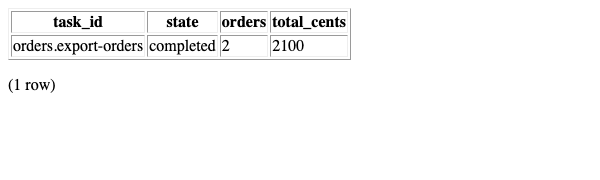
To produce the same focused result yourself, run this query against the container ID found above:
docker exec <postgres-container-id> psql -U relkit -d relkit -c "select metadata->>'relkitTaskId' as task_id, state, exit->'value'->>'orderCount' as orders, exit->'value'->>'totalCents' as total_cents from effect_mq order by enqueued_at desc limit 1"The worker must report ready at /_relkit/v1/health/ready, not merely have a running
container. An older local recipe left $POSTGRES_PASSWORD literal in the worker database
URL; the current recipe constructs that URL from the generated secret. Effect MQ may still
log a failed LISTEN subscription and fall back to polling; the completed run above was
observed with that warning present.
Effect MQ supports retryable execution and provider-native scheduling in its configured path. It does not advertise durable sleep or a managed-cloud profile. Keep work idempotent so a retry cannot duplicate an external effect. See execution policy for retries and provider comparison for other profiles.