Inngest
Configure Inngest, prepare an Orders CSV, and verify the registered job and provider run.
Use Inngest to give RELKIT tasks a durable execution path. You will prepare an Orders CSV from
validated order rows, submit the job, and confirm both registration and completion. You need
Bun 1.3.10 and a running Docker daemon. Start in a parent directory where relkit-inngest
does not already exist. The task returns CSV text; it does not write a file or query a database.
Configure an existing app
The --jobs inngest-docker creation tuple is currently rejected before staging because its native
and timing evidence is incomplete. Begin with an existing project and install the selected adapter,
native SDK and local Docker tooling before applying the configuration below:
From this guide’s application/package root, install only its selected requirements:
bun add @relkit/docker@0.7.12 @relkit/inngest@0.8.1 @relkit/local@0.7.12 inngest@4.20.0Keep these owner-specific versions and the lockfile together. Runtime SDKs belong in dependencies; build/type tooling belongs in devDependencies. Installing an adapter does not supply its optional SDK peers or enable the feature’s configuration.
The jobs entry connects the default job service to the Docker-backed Inngest adapter.
defaults.jobs selects that service for the Orders job. Extend the existing config with the two
jobs entries; keep its current app ID and server settings.
/** Declares task application defaults with inspection disabled until selected. */
import { defineApp } from "@relkit/app/config";
import env from "@app/platform/env.js";
import { docker } from "@relkit/docker";
import { inngest } from "@relkit/inngest";

export default defineApp({
  id: "relkit-inngest",
  env,
  server: { port: 3000, maxBodyBytes: 1_048_576 },
  telemetry: { redaction: { mode: "development-redacted", maxBytes: 65_536 } },
  jobs: { default: docker(inngest()) },
  defaults: { jobs: "default" },
});
Set up Inngest locally
inngest-docker runs Inngest’s local server, PostgreSQL, Redis, and a RELKIT worker. You do
not need an Inngest Cloud account, an API key, or a separate inngest dev process for this
profile. bun run relkit local up --detach creates provider credentials and connects the
worker to the Inngest server. The generated config above is the connection point; do not
paste the generated signing or event keys into source files. Start the RELKIT backend with
bun run dev after the local services are healthy.
To find Inngest’s dashboard address, inspect the mapped port and open the 127.0.0.1 URL
for the container ending in service-inngest. The host port is allocated dynamically, so
8288 is the container port, not necessarily the port to enter in your browser.
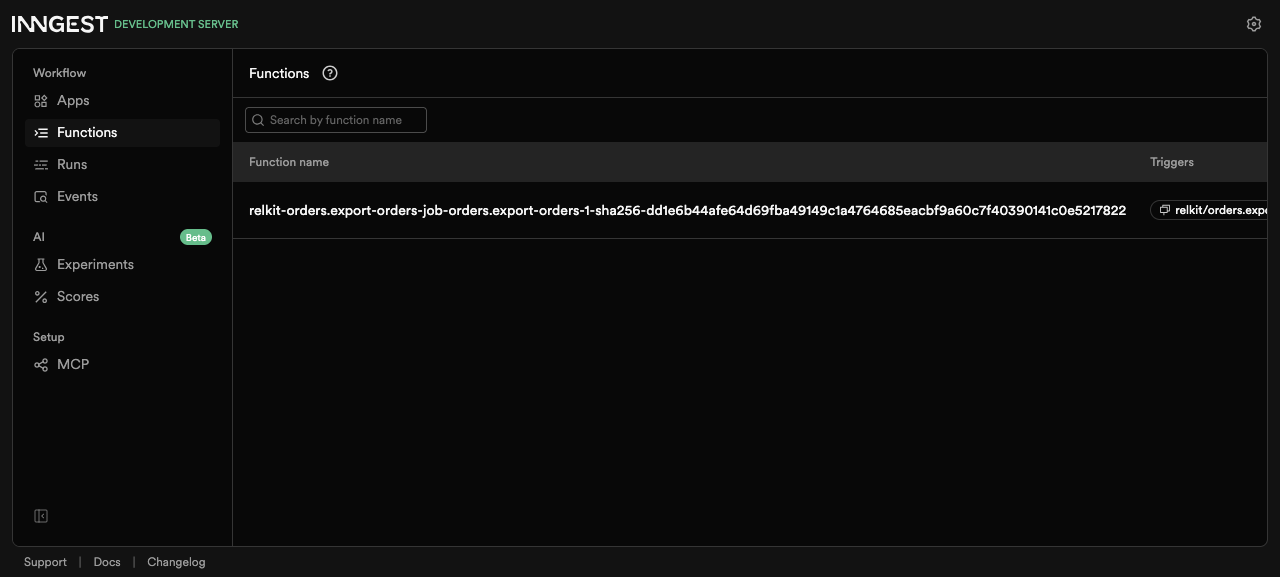
docker ps --filter name=service-inngest --format '{{.Names}} {{.Ports}}'In the dashboard, Functions must list the Orders export function after the backend starts. This historical screenshot records a fresh flat-layout local-source fixture; its native registration evidence predates the grouped move and does not certify a new creation tuple.
Add the Orders boundary
These instructions extend an existing application; they do not create a jobs starter.
For a grouped minimal app, create src/services/orders/functions, tasks and jobs.
Add the following boundary and health function. In a compatible flat app, use its
existing src/orders/ root consistently instead. If Orders already exists, extend
its public functions rather than replacing the boundary.
/** Declares the orders service boundary and its public members. */
import { defineService } from "@relkit/app/services";
import exportOrders from "@app/services/orders/jobs/export-orders.job.js";
import exportOrdersTask from "@app/services/orders/tasks/export-orders.task.js";
import health from "@app/services/orders/functions/health.function.js";

export default defineService({
  functions: { health },
  tasks: { exportOrdersTask },
  jobs: { exportOrders },
});
/** Supplies the orders service with a validated health result independent of job execution. */
import { defineFunction } from "@relkit/app/functions";
import { z } from "@relkit/app/schema";
export default defineFunction({
id: "orders.health",
input: z.object({}),
output: z.object({ ok: z.literal(true) }),
handler: async () => ({ ok: true as const }),
});Add src/services/orders/jobs/export-orders.job.ts from the maintained task fixture:
/** Registers the export task as a public job exposing trigger, lookup, list and watch with progress/output fields. */
import { defineJob } from "@relkit/app/jobs";
import exportOrders from "@app/services/orders/tasks/export-orders.task.js";

const exportOrdersJob = defineJob({
  id: "orders.export-orders-job",
  name: "exportOrders",
  task: exportOrders,
  client: {
    public: true,
    operations: ["trigger", "get", "list", "watch"],
    fields: ["status", "progress", "output"],
  },
});

export default exportOrdersJob;
The task file below supplies the job’s imported target. Create the sample input file when absent. Keep existing durable task/job IDs and bump the task version when changing an already deployed contract.
Read the task before running it
Add or update src/services/orders/tasks/export-orders.task.ts with this example. The
input describes actual order lines; the task calculates each line total and returns CSV text
plus a reconciled total. It emits progress after each row. The IDs and SKUs in this example
are simple values without commas or newlines; add CSV escaping before accepting arbitrary
customer-provided text. Since this is a fresh app and no run has been deployed, the version
remains 1. Bump it when changing a deployed task contract.
import { defineTask } from "@relkit/app/tasks";
import { z } from "@relkit/app/schema";

const order = z.object({
  id: z.string().min(1),
  sku: z.string().min(1),
  quantity: z.number().int().positive(),
  unitPriceCents: z.number().int().nonnegative(),
});

const exportOrders = defineTask({
  id: "orders.export-orders",
  version: "1",
  execution: "durable",
  input: z.object({ orders: z.array(order) }),
  output: z.object({ csv: z.string(), orderCount: z.number().int(), totalCents: z.number().int() }),
  progress: z.object({ completed: z.number().int().nonnegative() }),
  handler: async ({ orders }, context) => {
    const lines = ["order_id,sku,quantity,total_cents"];
    let totalCents = 0;
    for (const [index, item] of orders.entries()) {
      const lineTotal = item.quantity * item.unitPriceCents;
      totalCents += lineTotal;
      lines.push([item.id, item.sku, item.quantity, lineTotal].join(","));
      await context.progress.emit({ completed: index + 1 });
    }
    context.log.info("Orders CSV prepared", { orderCount: orders.length, totalCents });
    return { csv: lines.join("\n") + "\n", orderCount: orders.length, totalCents };
  },
});

export default exportOrders;
The explicit src/services/orders/jobs/export-orders.job.ts names the public exportOrders job and
allows trigger, get, list, and watch operations. The task owns execution; the job controls
admission and the client-facing operations.
Create or update examples/export-orders.json with the following input. The two rows produce
orderCount: 2, totalCents: 2100, and CSV lines with totals 900 and 1200.
{
  "orders": [
    { "id": "order-1", "sku": "tea", "quantity": 2, "unitPriceCents": 450 },
    { "id": "order-2", "sku": "mug", "quantity": 1, "unitPriceCents": 1200 }
  ]
}
Start and submit a run
Check the app, start Inngest and its local dependencies, then leave the development server running. Start the provider before the backend so the worker can connect.
bun run check
bun run typecheck
bun run relkit local up --detach
bun run relkit local status
bun run dev
In a second terminal, first prove that RELKIT registered exportOrders with task
orders.export-orders on the default profile. Then trigger the job. The trigger response
is an acceptance receipt, not proof of execution. Copy its runId into the final command.
bun run relkit jobs capabilities
bun run relkit --json jobs list
bun run relkit --json jobs trigger --job exportOrders --input-file examples/export-orders.json --operation-id orders-csv-1
bun run relkit jobs runs get --run-id <runId>
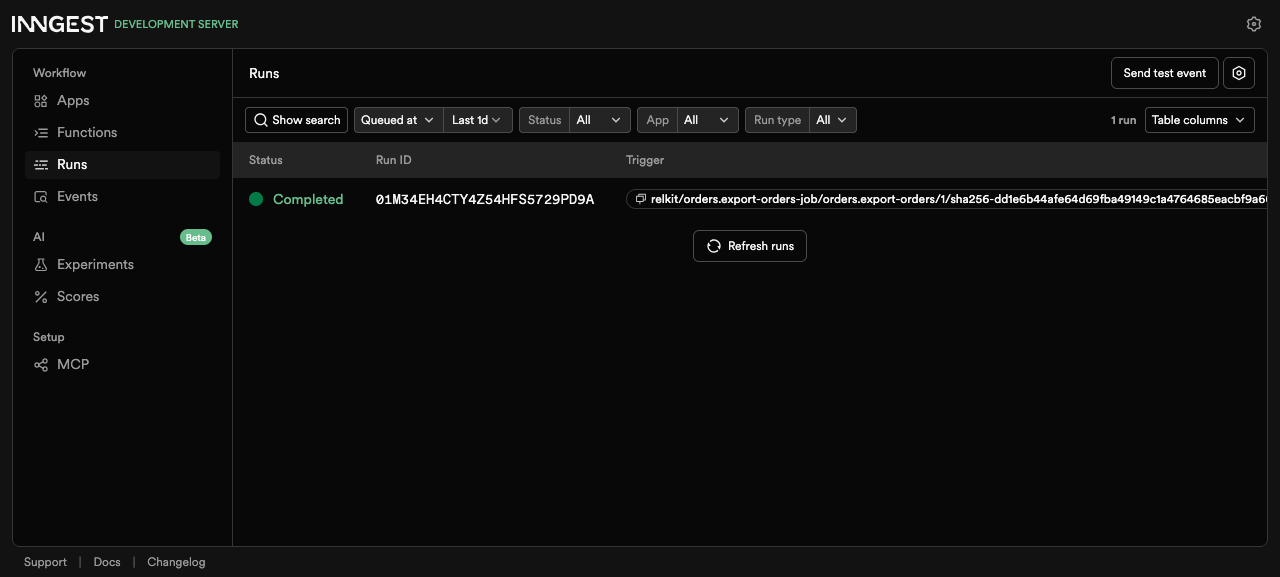
Repeat the read until run.status is completed. The run moves from the event: receipt
to an Inngest-native run ID. In a local-source check, the worker logged Orders CSV prepared
with orderCount: 2 and totalCents: 2100, and the native run completed. The current
Inngest run lookup may report resultAvailability: "void" even when the task returns CSV;
use the worker log to verify totals and do not rely on this lookup to download the CSV.
If the run remains pending, inspect bun run relkit local status and the backend terminal.
Open Runs in the same Inngest dashboard. The completed row below is the native run of the registered Orders export function from that fresh app, not merely a RELKIT acceptance receipt. Match its function name and run ID to your own run when repeating the steps.
The current Inngest path supports UTC cron schedules and durable sleep. Interval schedules,
arbitrary timezones, overlap policies, and historical-build resume are not established by
this profile. The documented limits are 1 MiB each for input and output, 64 KiB for a
progress item, and 100 items for run listing. Check jobs capabilities for the selected
environment before using an optional operation. Continue with job clients
to trigger and observe runs from application code.